Step 4: All About Hashtags And Twitter Chats
Welcome to the fourth step in our free professional learning series on building your PLN.
In our previous step, we introduced you to Twitter and explained how people use it to build their PLN.
The aim of this step is to:
- Explain what hashtags and Twitter chats are.
- Explain the benefits of participating in Twitter Chats with your PLN.
- Provide tips for getting the most out of Twitter Chats
Before we begin explaining Twitter chats, we should break down hashtags which are an important part of Twitter.
A hashtag is written with the “#” hash (pound) sign and is used to index keywords or topics on Twitter.
Putting a hashtag symbol (#) in front of a relevant keyword or phrase helps to categorize the tweet and make it easier for people to find.
Hashtags can be used anywhere in a tweet. They can replace a word as demonstrated below, or just be tacked on to the end of a tweet.
Have you ever tried creating #podcasts with your students? It’s easier than you might think. Check out our Edublogger’s guide to podcasting to go through all the basics! https://t.co/11Kf0QZG6B pic.twitter.com/JXIS2sVbNV
— edublogs (@edublogs) June 30, 2018
When you click on the hashtagged word or phrase (e.g. #podcasts) a new page will load with tweets from everyone who is tweeting about podcasts — whether or not you follow those people.
Note that hashtags can’t have any spaces so math chat becomes #mathchat.
What Hashtag Should I Use?
You can use any hashtag you like, however, if it’s not being used by others then people won’t be following it or searching for it. So to get the most out of hashtags, you should usually use ones that others are using.
Note that hashtags are not created by Twitter, but by Twitter users. Often if there is an event going on, the organizers will publish the official hashtag on the conference materials and social media.
For example, when ISTE 2018 was happening, ISTE tweeted out the official hashtag:
Are you following the official hashtag for #ISTE18? Watch for behind the scenes content, tag your posts to share YOUR learning journey and find new connections! pic.twitter.com/V8UnYN2Wsu
— ISTE (@iste) June 22, 2018
You can type a hashtagged keyword in the search bar on Twitter to discover tweets and accounts based on your interests. There are easier ways to follow hashtags so you don’t have to keep running the same search.
TweetDeck is commonly used to follow hashtags that you want to keep track of regularly (the Twitter search bar is fine if you just want to do one-off searches).
Check out this video by Jennifer Fox to find out how to set up TweetDeck to follow hashtags.
Starting Your Own Hashtag
Hashtags are community driven and anyone can start one. Maybe you want to start your own hashtag with a group of people from your PLN who have a similar interest.
Say you’ve been talking to a group of teachers about using greenscreen technology and you thought you could use the hashtag #greenscreen101 to keep the conversations going.
To avoid using a hashtag that is already being used, it’s advisable to search for that hashtag first. Things can get confusing if your hashtag is being used by another group!
Simply search in the Twitter search box for your preferred hashtag or use a free tool like hashtagify.me.
Here I can see that #greenscreen101 hasn’t be tweeted in a number of years, so it would be fine to use.

Fun Idea: Use Your Own Hashtag To Find Your Tweets
Kathleen Sokolowski has shared a handy tip about creating your own personal hashtag in order to find tweets that you want to remember or come back to.
Read all about it in her article on creating a Twitter Digital Notebook.
If you are like me and frequently read articles and posts that resonate, challenge you or speak to you in some way, consider creating a hashtag for yourself! When you want to find your tweet again, just search for your hashtag in the search bar and be sure to click “Latest” to see all your tweets.
Finding Popular Hashtags
Maybe you’re a teacher tweeting about the arts. You’d like to include a hashtag in your tweet to reach a larger audience but you’re not sure what the popular hashtags are in that niche.
You might have seen #arted used but you’re not sure if this is a popular choice.
A tool like hashtagify.me can be really handy (the basic features are free).
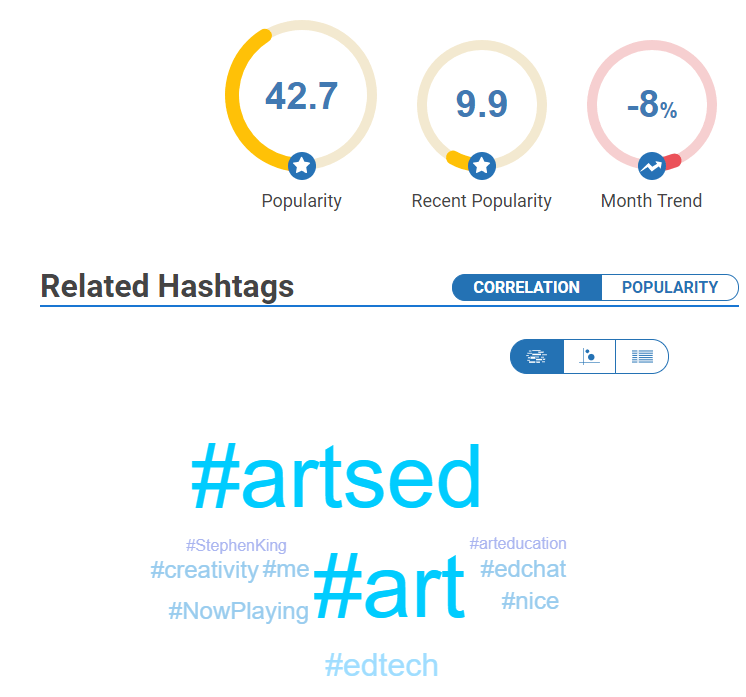
When I type in #arted I can see that the popularity is 42.7 (on a scale of 1-100). It also shows me a wordcloud of related hashtags. The bigger the hashtag, the more popular it is. #artsed (with an s) stands out.
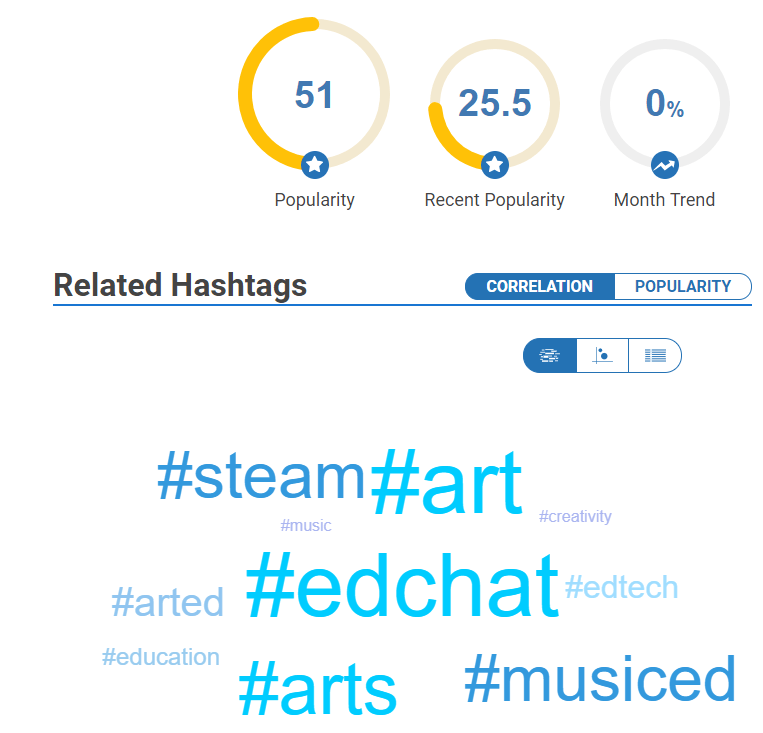
Clicking on #artsed in the word cloud shows me that the popularity is higher (51) and I can also see some related hashtags I could explore as well.
Popular Hashtags In Education
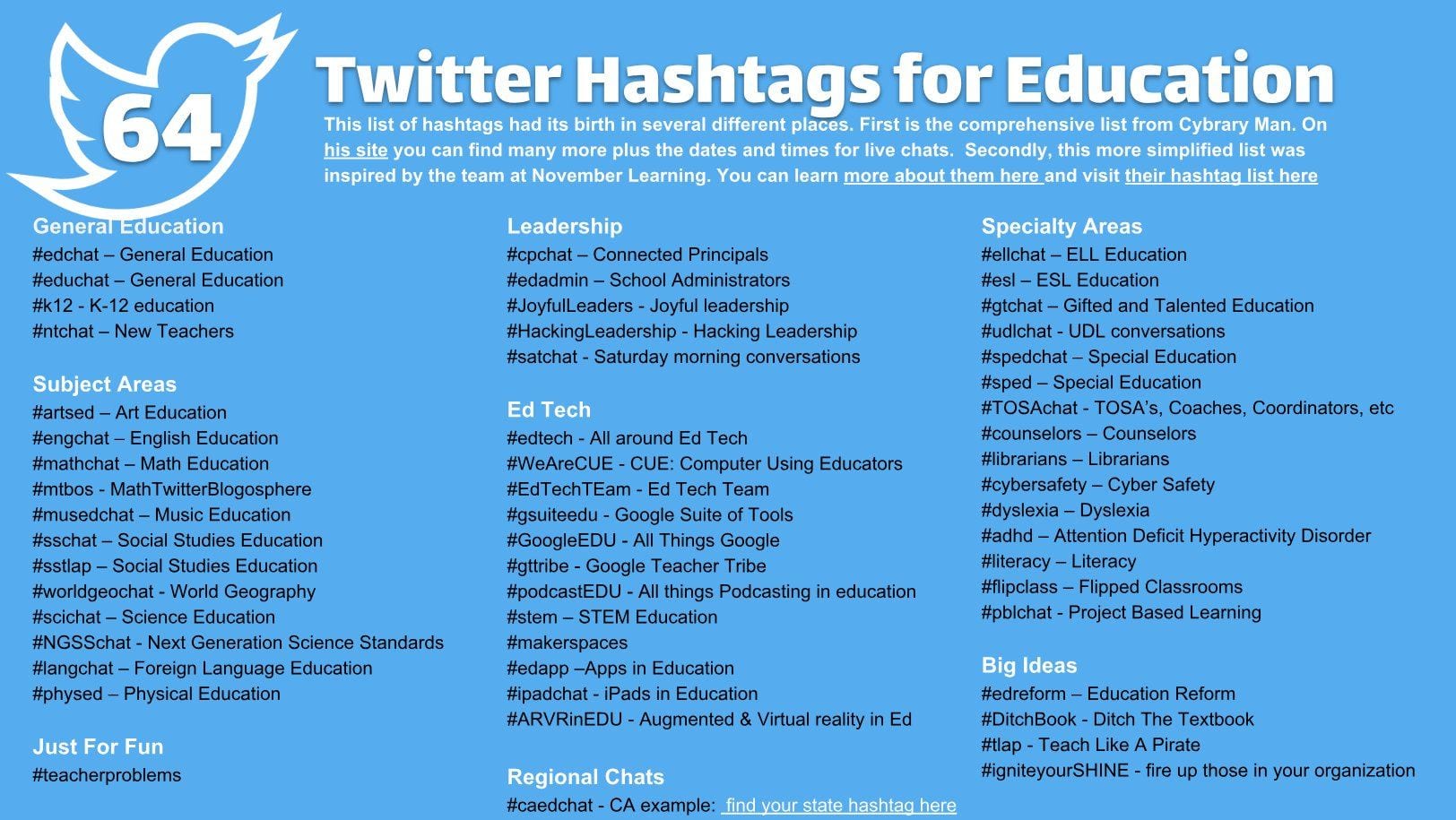
Jerry Blumengarten (aka Cybrary Man) is well known for curating hashtags used in education. You can find the complete list on his site.
Ryan O’Donnell has also used information from Cybrary Man’s site and the November Learning team to curate a list of popular hashtags in education.
Find the original image here.
Trending Hashtags

When you’re on your Twitter home feed, you might have noticed “Trends for you” on the left hand side. This is located in the search tab of the Twitter mobile app.
Trending topics are a mix of hashtags and regular phrases that show what’s currently being tweeted about most. They’re tailored for you based on your geographical location and who you follow.
You can click on these trends to find out more and join in the conversation by leaving a reply or tweeting something of interest.
Like a lot of aspects of Twitter and social media, clicking on trending topics can take you down a rabbit hole. So be warned! 😉
What Are Twitter Chats?
As we just saw, hashtags make it easier to search and follow the Twitter conversations on specific topics at any time. Sometimes people gather around to discuss a specific topic at a specific time. This is a Twitter chat and a hashtag is the glue that brings the Twitter chat together.
We’ll now take a look at how Twitter Chats work and break down how you can get involved.
If you’d prefer to watch a video to learn, this is a great short overview of Twitter chats by The University of Nebraska Medical Center.
Twitter chats are one of the best ways for educators to connect with other educators, exchange and debate ideas, ask for help and provide assistance, find new resources and take action.
Twitter chats are where educators meet at a set “meeting time” to engage in conversations by sending out tweets on a topic using a designated hashtag during a specific time on a certain day. Most Twitter chats last for an hour.
During the Twitter chat, you’ll see educators tweet their responses in real time. The best way to participate in a Twitter chat is to set up a search for the hashtag in TweetDeck, Hootsuite, or in the Twitter app on your mobile device.
Check out Laura Moore’s video which explains how to take part in a Twitter chat using TweetDeck. The video goes for 25 minutes because Laura has recorded herself participating in an actual chat. You can just watch the first few minutes if you just want to learn how to get set up for a chat.
Participating In A Twitter Chat
Twitter chats normally have a moderator (or several) who guide the conversation during the chat using a Question and Answer format.
Prior to the Twitter chat, the moderators decide on the topic of the chat and organize a series of 5-10 questions to ask during the chat.
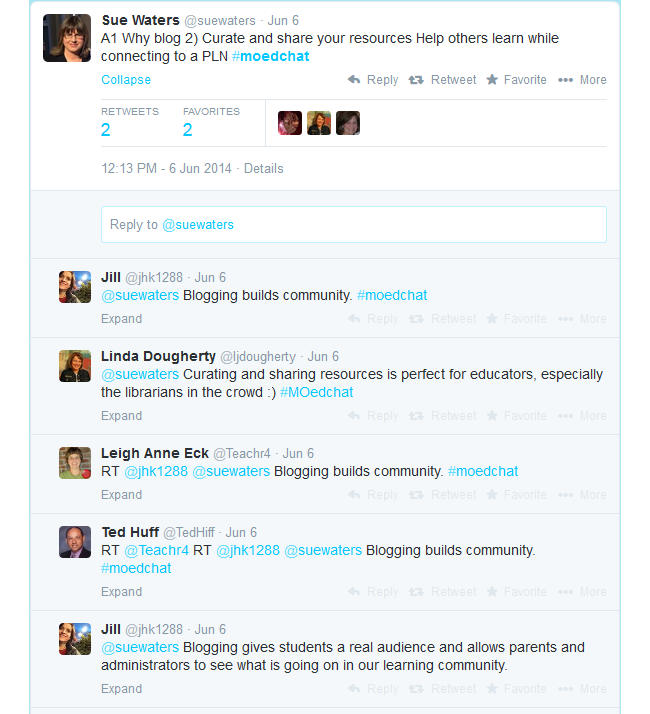
Below is an example of a Twitter chat using #moedchat (Missouri Educators Chat).
The chat normally starts by introducing the topic and asking participants to introduce themselves.
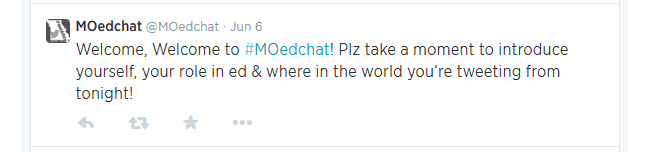
Participants respond by including the hashtag for the chat in their tweet (in this example all replies include the hashtag #moedchat).

Once introductions are finished the moderators will commence guiding the conversation using their questions. Each question is normally starts with a Q and a number to indicate which question it is.

Participants’ replies normally start with an A and a number to indicate which question they are answering as well as the chat hashtag.

Twitter chats are a conversation — you can add your extra thoughts to anyone’s answer by replying to their tweet and including the hashtag. Provided the hashtag is included, everyone in the Twitter chat will see your reply.
I Can’t Keep Up With A Twitter Chat
Tweets can fly fast in a Twitter chat! Don’t worry if you can’t keep up.
Here are some tips to help:
- Archives: Moderators often archive or curate the information and resources shared during the chat session. This used to be through tools like Storify but this service has closed. Sometimes a tool like Wakelet is now used or there will be a specific website for a Twitter chat.
- Be prepared: Moderators often publish the questions that will be asked in advance so you can think ahead. You can also get your Tweetdeck set up before a chat so you’re ready to go.
- Be selective: You don’t need to answer every question. Twitter chats are very flexible. They often go for an hour but no one minds how long you stay or how involved you are.
- Follow up: If you were interested in what someone had to say but you found the tweets were flying too fast, don’t worry. You can resume the conversation with people at any time.
- Bookmark: A relatively new feature of Twitter for mobile is Bookmarks. You can bookmark Tweets you’d like to refer to later. Tap the share icon next to a tweet and select Add Tweet to Bookmarks. Tap Bookmarks from your profile icon menu to access your saved tweets.
- Like: If you like a tweet by pressing on the heart, you can go back and look at these later. Just click on the Likes from your profile icon menu.
- Lurk: It’s fine to just watch a few chats before you decide to contribute. The first question is generally an introduction so don’t be afraid to say it’s your first time participating either.
Popular Twitter Chats
Education chats generally occur in the evenings each week, either during school terms or throughout the whole year. Most chats focus on a particular topic, subject area, theme, or year level.
Some states or countries have their own chats, but anyone is welcome to take part in any chat.
Finding Twitter Chats
Now you know about Twitter chats it’s time to find one and take part!
There are many places to find chats that interest you and work with your schedule.
- Check out the Twitter chat calendar for educators.
- Explore Kasey Bell’s Educational Hashtag and Twitter Chat Database. You can submit your own hashtags too.
- Participate.com/chats is another place to find educational Twitter chats organized by your timezone.
Examples Of Twitter Chats
Here are a few examples of popular Twitter Chats to help you get started:
All the times listed below are in Eastern Standard Time (USA).
- Use this time zone converter to help figure out what time this will be for you.
- Double check the time by clicking on the links as things can change with daylight savings etc!
- Please let us know if we have any of the information below incorrect.
#edchat
The “original” education chat. This one is very busy and fast paced. Takes place on Tuesdays 12 PM and 7 PM EST. Learn more here.
#edtechchat
This chat focuses on educational technology and is held every Monday at 7 PM EST. Find out more here.
#NT2T
NT2T stands for “New Teachers to Twitter”. Held Saturdays at 8 AM. For more information, click here. Tip: There is also a Twitter mentor program for newbies.
#whatisschool
Educators discuss shaping the future of school. Takes place Thursdays at 7 PM. Find out more here.
#kinderchat
A chat for those working with younger children. Held on Mondays 2:30 PM and 8 PM EST. Learn more here.
#spedchat
For special education (see more here). Takes place on Tuesdays from 9 PM EST.
#ditchbook
Created by Ditch That Textbook author Matt Miller. The chat focuses on innovative teaching ideas. Takes place on Tuesdays from 9 PM EST. Find out more.
Conclusion
Twitter might feel overwhelming but if you give it a chance for a few weeks it will really start to make sense and you will see how it’s so popular with educators.
You’ll also notice that Twitter chat hashtags are often used outside of the designated time frame to share resources, ask questions and help each other. The hashtag becomes a community!
If you need help at any time you’re on Twitter, just tweet one of our team e.g. @edublogs, @kathleen_morris, @Edublogs_Eugene, or @suewaters.
Your Task
We’d like you to add your voice and ideas to our ongoing conversation about PLNs by undertaking one or more of these challenges:
- Browse: Do a Twitter search of one of the Twitter chats and check out the information shared during the chat. For example, tell us about any resources, or ideas, you discovered reading through the Twitter chat conversation.
- TweetDeck: Set up TweetDeck and add a column for a hashtag you want to follow. Leave a comment on this post to share how you went setting up TweetDeck and share your tips for other newbies on using TweetDeck.
- Join a Twitter Chat. Leave a comment on this post to share what you learned from participating in the Twitter chat. Tell us about any resources, or ideas, you discovered during the chat.
- Blog Post: Write a blog post about your initial impressions of Twitter Chats. You could include — what you see as obstacles to taking part in Twitter chats, what you have learned from participating in a Twitter chat, or tips for someone new to hashtags or Twitter chats. Don’t forget to leave a comment here with the link to your post.
Also feel free to leave a comment to ask any questions or share your tips.
How to leave a comment: Scroll down to find the comment box. Write your comment, then enter your name and email address (email addresses are not published). Enter the anti-spam word. Press submit and we will moderate your comment ASAP.
627 comments on “Step 4: All About Hashtags And Twitter Chats”
I had never used Twitter for education until today and that Chat that I found useful was one with #mathschat #teaching #education #edchat #mathed and it was working with math in which Iwork with my struggling learners with. I found this very helpful.
I looked at #kindershat and I found a video about a pre-k teacher talking about how parents should trust teachers with their children because they spend a lot of time in the classroom. Communication from teachers to parents and families helps parents feel calm and safe about where they bring their children.
I took a look at #edchat and one of the first things I saw was someone asking if any other teachers feel like the pandemic has conditioned parents and students to feel like attendance is optional. I totally feel this because attendance is a huge issue everywhere I have taught so far and I have heard it is an issue in surrounding areas. Seems like this is pretty widespread. I do think that the pandemic fed the apathy that many parents and students now have for education and its importance.
In Twitter Chats I have been a part of before, I’ve found many new resources regarding reputable news sources so I can make sure to be a better advocate for all students. However, I feel that a lot of spaces, the people discussing will start talking over eachother when there comes disagreements. I feel like with good moderation, it can be a great platform for producing productive conversations.
The Twitter chat that I decided to participate in was #edtechchat. This was extremely informative because it is an educational chat that promotes technology within education. I found many resources and gained a lot of knowledge from this. I discovered that there are a lot of digital tools available within education, you just have to be willing to find them. There was a lot of information about conferences and various ways to be involved with different educators and I appreciated this because I can utilize it to build my PLM.
I looked through the #EdChat, and I found a lot of interesting discussion regarding implementing research and best practice into the classroom. I can see how keeping up with something like #EdChat makes you a more informed practitioner. It was very interesting and informative.
I looked up a variety of teaching networks. One that I found is Teacher Toolkit.co.uk, this one is great because it delves into the world of neuroscience in education as well as instructional design.
I find it incredibly overwhelming to try to follow a twitter chat. There are too many possible replies and having to follow which tweet is a reply to which is confusing. I do see the value in them as a resource. You can find answers to questions you might have about a situation you are in, suggestions for how to teach a lesson, links to files, videos of demonstrations, and much more. I find the most value in going back and reading through the responses to a particular question than in trying to participate myself.
I checked out the #whatisschool conversation. I enjoyed that the discussion contained humor and creative ideas; for example, a teacher went viral for creating a food truck business assignment for her students. It involved math and science. Ths was very creative and relatable to the children.
I searched #Edchat, and I found great resources and ideas in the conversation for all different grade levels that could be beneficial for a teacher to implement in their classroom.
I love hashtags, it personally narrows down exactly what I’m looking for when it comes to inspiration in the classroom. Also, anyone can add more useful resources through a hashtag, for example, if I am looking for resources on early literacy, I can simply type that in the search bar and most likely there will be a hashtag or page that will lead me to what I’m looking for. Honestly, it’s a great tool to use for your personal benefit and the benefit of others.
I read through some of the material from #edtechchat, and there was a link on AI use in the classroom that was really interesting. It talked about AI’s tendency to reflect societal biases and how that can affect students.
I decided to search #edtechchat to see if there was anything new regarding technology that I should know about. I found many articles ranging from “How to Optimize Feedback in Virtual Environments…” to creating rubrics with ChatGPT. Majority of the most recents posts were about using generative AI to help with lesson planning and how to teach AI to students. Majority of the top posts were by two of the same people @ms_deljuidice and @dwdeeds. It would have been nice to see a wider range of users as these two users share a lot of the same content.
I took the opportunity to look through #edchat on Twitter (X). On the thread, educators shared ideas for lessons and activities, different tools to use in the classroom, and podcasts/videos that can support student learning. I was able to look at one of the podcasts on the thread, and it was very exciting and age-appropriate for elementary school students.
I looked at the hashtag #ditchbook. In this chat there where multiple ways to keep students engaged, toolkits, ways to have students discuss, and activities. My favorite was a post by @tonyvincent and he gave a Google Slides template of spinners for a fun new way to do storyboards.
Hashtags are so important in order for your opinion and statement to be heard. It is also important in order to find others statements and experiences.
I searched “#2ndgrade” on Twitter and found a plethora of lessons, pictures of students and activities. I want to teach 2nd grade and this hashtag game a great glimpe of what occurs in 2nd grade. However, some of the hashtags commented above do not show up or are unavailable. This is an accessibility issue at times. Twitter is better for more general ideas and communication, having long or super niche hashtags lowers your chance of results!
While browsing the #kinderchat on Twitter, I came across a variety of tweets and videos showcasing innovative teaching strategies for kindergarten. Educators shared engaging ideas, such as using play-based learning and interactive storytelling to enhance literacy skills. I particularly enjoyed a video of a teacher guiding her kindergartener through explaining the difference between /v/ and /th/ sounds on her own. Many teachers discussed effective classroom management techniques tailored for kindergartners, emphasizing the importance of establishing routines and building strong relationships with students. Overall, the chat provided a wealth of practical resources and inspiring insights into early childhood education.
I decided to look up “edchat” to see what information was being shared about educations and if there were any relatable resources that I could potentially use for my classroom. I saw an author, named Danny Nicholson who created ab ook about some science experiments that teachers could do in class. This could potentially be a good resource for making the classroom more interesting.
Another post that I found was by Aviva Dunsinger highlighting how important it is to call students by thar name. He gives tips on how to quickly remember students’ names.
Task 1: While browsing the #kinderchat on Twitter, I came across a variety of tweets and videos showcasing innovative teaching strategies for kindergarten. Educators shared engaging ideas, such as using play-based learning and interactive storytelling to enhance literacy skills. I particularly enjoyed a video of a teacher guiding her kindergartener through explaining the difference between /v/ and /th/ sounds on her own. Many teachers discussed effective classroom management techniques tailored for kindergartners, emphasizing the importance of establishing routines and building strong relationships with students. Overall, the chat provided a wealth of practical resources and inspiring insights into early childhood education.
Personally, I found participating in the Twitter chat to be a little bit overwhelming. While I can see how it could be helpful to teachers to collaborate and get really good information an feedback on topics, I found it to be a little bit overwhelming and confusing. Granted, I am not nearly as familiar with Twitter as I am with other resources or platforms, so my opinion is a bit biased because of that. However, I enjoyed reading through some of the comments/posts that people had contributed, especially in the #whatisschool chat. It was interesting to read peoples’ ideas about the future of schools and seeing perspectives that I may not have thought of before.
I found it difficult to find active conversations on Twitter. I did find many links and videos through the hashtag #edchat. I found an article about including the Native American population’s perspectives in our classrooms. The link led me to an Edutopia article. This content is beneficial in my 4th grade California History lesson planning.
Twitter chats seem very interesting, but every time I look one up, including the Education Chats mentioned here, they are no longer active. I keep finding the last posts being 2018 or 2021.
I took a look at #edchat and scrolled through the most recent chat. Someone had asked why teachers are leaving the profession. There are many different responses to the question. Some common reasons mentioned are lack of support from administration, poor funding, and the toll it takes on educators physically and mentally. Outside of the most recent chat, many educators were posting about ideas they performed with their students, such as having the students each dress up as the definition of a difficult word. The most recent post is an ad promoting a teacher dynamic podcast.
I loved participating in and moderating Twitter Chats when we did them with a professional group I worked with. They were so much fun! I miss tweetdeck. Now you have to pay for it. I do love a good hashtag though!
I just read through an edchat and it was very interesting. I saw many resources that were being shared to help teachers be better. Most of the conversation was about how cell phones are affecting students in the classroom. Some teachers were opposed to letting their students have their own phones in class but some teachers were not bothered by it. There was a lot of talk about how they are a distraction and its causing students to not be good with grammar and writing skills.
Hashtags are beneficial but sometimes hashtags become popular and opinion based. So tweets with the most likes are shown first.
I searched #phonics and was met with a variety of tweets. There were lessons, opinions on phonics and its teachings, and lots of encouragement from fellow educators. I was able to gather a lot from this quick search and hope to continue to utilize this service.
I was interested in looking through Kinder Chat on twitter/X. On #Kinderchat, they shared tips for making learning fun and resources for setting up playful classrooms. It was all about using play to help kids learn and grow socially and smartly. The chat made it clear that play is super important for little ones and gave great ideas to try out. I am definitely going to use some of these in the future, especially because I want to teach kindergarten or first grade.
I was reading through the #edtechchat which was very helpful there are a lot of resources that I did not know of. One of the posts was talking about how Padlet is now able to auto-caption videos. This is great because it makes captioning time less but having captions on videos makes it accessible for students who are maybe watching a video at home made by their teacher.
A tip I have for someone new to hashtags or Twitter chats would be to be aware of some of the comments you read in the Twitter chats because not everything you see on the Internet is true or helpful, even when its coming from your community.
I browsed different bible story related crafts! I was hoping to find any ideas for the Elementary students I teach at my church. There were many photos of different ideas that were navigate and look through.
I searched #edtech because I always look for ways to blend technology with education. I stumbled upon a company called Merlyn for Education, which is an AI assistant for education. I’m not entirely sure what it is yet because I didn’t have the time to delve into it, but it piqued my interest. I’ve bookmarked the site to explore it more thoroughly during my free time.
I think the Twitter chat/ hashtag function is one of the best features of the platform. You can pretty easily get a good look at the larger discourse when you follow the hashtags to their bigger forums. It’s intuitive because the more hashtags you see of something, the more likely you are to stumble upon a big conversation. Subsequently, the more likely others are to stumble upon a conversation.
I searched #Edchat, and I found a plethora of great resources and ideas in the conversation. One of those ideas is the 5 E’s instructional model that includes engage, explore, explain, elaborate, and evaluate.
I searched Edchat and it had different resources available. I find it so good that these helpful resources are on these big platforms because they make a difference.
I searched #edchat on X, and for me personally I didn’t connect with the conversations that were going on. I think it may be because I’m unfamiliar with the platform, but I just couldn’t find any useful material to me. I’m sure these chats and hashtags work great for other teachers!
Hashtags are used to sort through genres of topics that are being shared all throughout the internet. Hashtags help to target what a certain audience may be looking at or interested in.
I looked at the Twitter page #whatisschool because I thought it would be interesting to see what educators have to say about the future of schooling since that seems to be a hot topic in the media right now. There were some posts from educators using examples of activities that teachers did in the classroom that had real-life, post secondary applications. For example, there was a middle school that participated in an interview day with local community members where they had to dress up and were asked questions like “who am I?” and “what is a worthwhile life?”. I thought this was a great idea because interview skills are an important job and life skill that I don’t believe students get enough practice with. It is important to teach students components of a good interview and allow them to practice interview skills. There were a lot of articles and resources on various topics related to the future of education from an account called PeerTutoringResource which focuses on providing free peer tutoring to students in public schools. Some of the articles that I found interesting were about the controversy of including meditation in classrooms and the debate of the 4-day school week. The page also has different webinars that educators can attend for professional development.
I searched #edchat and it had a lot of good resources for activities to use in the classroom. There’s different grade levels and difficultly to choose from which makes a great variety to choose from.
I scrolled through the #ditchbook page because I am always interested in new innovations and creative ways to utilize resources. Some helpful things I found were: tips for saving time on Google Forms, how to create a psychology-safe environment, and creative icebreaker games. This looks like a very fun and interesting chat with varied responses, all helpful, so I look forward to utilizing this PLN resource in the future.
The article did a fantastic job of explaining hashtags and Twitter chats. I don’t use Twitter, but hashtags can be used on other platforms. I would expect to find some great “chats” on LinkedIn.
Participating in my first Twitter chat about innovative teaching practices in STEM education was a rewarding experience. I discovered valuable resources, such as a guide on integrating robotics into elementary STEM curriculum, and learned about using augmented reality apps for science experiments. The chat discussions also touched on promoting collaboration among students through platforms like Google Classroom and Padlet. Practical tips, like using breakout rooms for group projects, were shared to enhance student engagement. The chat helped me realize the importance of networking with educators worldwide for continuous professional development. I plan to incorporate the new resources and ideas into my upcoming lessons and look forward to exploring more Twitter chats to further expand my toolkit and grow alongside the global education community.